
Display Planning
Car Photography Turntable Setup: A Showroom Planning Guide
Plan a car photography turntable setup around the vehicle, camera, lighting and floor. Prepare a showroom brief before confirming equipment and controls.
Layout planning
Coordinate the vehicle, camera and working space
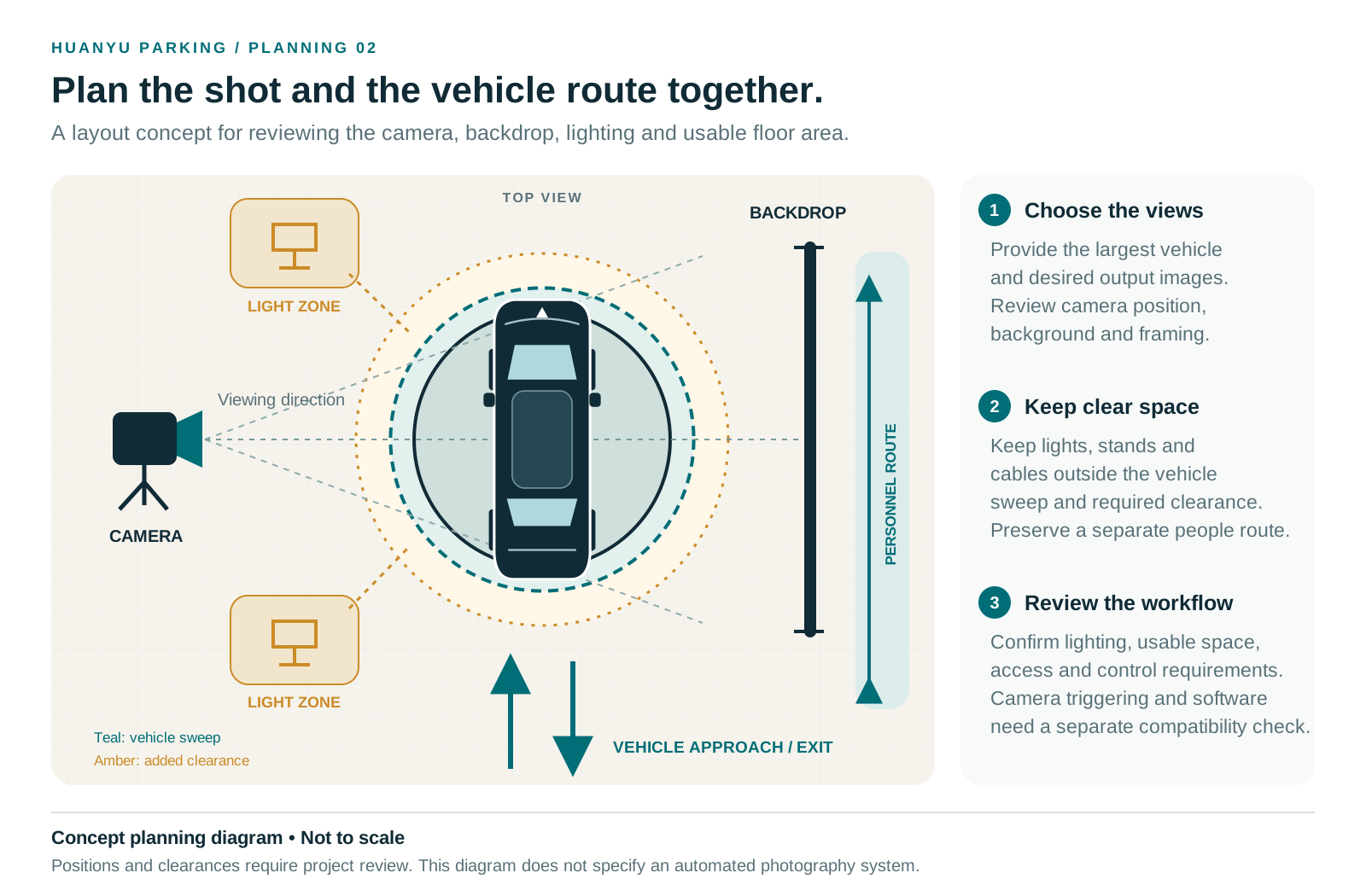
Review the camera, backdrop and lighting positions alongside the vehicle sweep, project clearance and access routes. Final positions depend on the vehicle, desired images and available space.
Concept planning diagram · Not to scale. Positions and clearances require project review. This diagram does not specify an automated photography system; camera triggering and software require a separate compatibility check.
Open full-size photography diagramPlan a car photography turntable setup from the vehicle, camera position and room layout together. Mark the vehicle approach, the area needed during rotation, the background, lights and operator position on one sketch. Then check the floor or pit condition before selecting equipment. A platform can fit the vehicle while leaving too little room for the planned photograph.
This guide helps a dealership, showroom or photography team prepare that layout and a usable project brief. It does not specify a camera system or confirm automatic positioning, camera triggering, software integration or capture speed. Huanyu must review those requirements for the selected configuration. For equipment selection, use the 360 car photography turntable link under Related planning pages below.
Begin with the photographs your team needs
Ask the photographer and showroom operator to describe the intended output before drawing the platform circle. Still photographs from selected viewpoints, a video clip and an interactive 360-degree presentation create different operating requirements. Record which output is required and which is only a possible future use.
For still photographs, list the views the team intends to capture and where the camera will stand. For video, record the intended camera position and whether the team expects to film while the vehicle rotates. If the project involves an interactive viewer, identify the capture and publishing software separately from the mechanical turntable. Do not treat a rotating platform as confirmation that a particular software workflow is included.
A shared display and photography area needs a second brief for customer-facing operation. Record the visiting hours, vehicle change process, visitor routes and the person who controls movement. The photographer's preferred camera position may occupy space the showroom uses for visitors. Resolve that conflict on the layout before ordering equipment or committing to floor work.
Put the vehicle, camera and approach on one plan
Start with the largest intended vehicle, including its overall dimensions, wheelbase and weight. Mark the clear entrance and show how the driver reaches the platform and leaves it. Include walls, columns, doors and any area that cannot form part of the vehicle route. Huanyu reviews the platform size with that site information; the buyer does not need to guess a diameter first.
Add the proposed camera position and background to the same drawing. Record the actual distance available for the photographer and equipment, rather than copying a studio dimension from another project. The photographer should check the intended lens and framing at the site. This guide provides no universal camera distance or lens specification.
Keep the camera working area distinct from the vehicle approach and the area the body occupies during rotation. Mark the operator's position, access to controls and the route people will use when the area is idle. The site team must review clearances and the operating arrangement before putting the equipment into use.
| Part of the layout | Record on the sketch | Review with |
|---|---|---|
| Vehicle and entry | Largest vehicle, clear opening, approach and exit arrows | Buyer and equipment engineer |
| Floor and platform | Existing floor or proposed pit, obstacles and desired floor interface | Contractor and equipment engineer |
| Camera area | Intended framing, camera position, equipment space and background | Photographer |
| Lighting | Light positions, windows and planned shooting conditions | Photographer and showroom designer |
| People and controls | Operator location, visitor routes and access to controls | Site operator and local safety team |
| Power | Available voltage, frequency, phase and proposed cable route | Site electrician |
Check framing and reflections before fixing the location
Use the intended vehicle or a suitable planning reference to test the proposed camera position. Ask the photographer to review the sides, front and rear within the planned frame. Check the background and note columns, windows, doors or showroom displays that intrude on the shot. A wider room measurement alone does not describe what the camera will see.
Record the lighting conditions for the trial photographs. Vehicle paint, glass and trim can show reflections from the surrounding room. The photographer should decide whether the planned lights and background suit the required images. If daylight reaches the space, test the conditions expected during the planned shooting hours before fixing a permanent layout.
Keep a small review set with notes about the camera and lighting arrangement. Use it to describe the result the photography team wants. It is not an equipment performance test, a promise of identical images or evidence that Huanyu supplies the camera and lighting system. The buyer's photography team owns those choices and checks them with the eventual operating setup.
Choose the installation direction from the floor
A finished or leased showroom may start with a CTB surface-mounted review. This direction uses the existing floor and an access ramp, subject to engineering review of the support and approach conditions. Check whether the landlord permits the proposed work and whether the visible ramp fits the showroom and vehicle route.
The ramp needs room. Record ground-clearance concerns and the route from the entrance to the platform, including door thresholds and nearby obstructions. The equipment engineer must review the vehicle and floor together. Avoid describing a surface-mounted installation as requiring no site work or as being removable without checking the proposed fixing and floor conditions.
A new-build or renovation project may instead allow a CTA pit-mounted review with a coordinated finished floor. The contractor needs the approved project drawings for the pit, drainage, conduit and surrounding interfaces before committing to construction. A general catalog diagram or photograph from another showroom is not a construction drawing for the current project.
Keep the selected structure and drive system clear in the document set. Instructions for one installation architecture do not automatically apply to another. Use the existing Installation planning link under Related planning pages below to record the site interfaces and the documents required from the project team.
Write control needs as requirements to verify
Describe what the operator needs to do during a shoot. Record how the team intends to start and stop movement, whether the photographer expects particular viewpoints, and where the operator can work without entering the planned image. Tell the engineer whether the same equipment will also serve a display role.
Separate these requested functions from confirmed capabilities. Positioning accuracy, stopping behavior, rotation speed, camera triggering, API access and compatibility with a capture application all require a project-specific answer. A request for them in a brief does not mean that a quoted turntable includes them. Ask for the agreed control scope and any acceptance method in writing before purchasing.
Have the site electrician confirm voltage, frequency and phase. Include the proposed cabinet and cable positions on the layout. Do not choose the control location only because it is outside the camera frame; the operator and local team also need to review access and the operating arrangement.
Prepare a brief the showroom team can use
Keep one current document for the photographer, buyer, contractor and equipment engineer. Give it a revision date and identify the open questions. If the room layout changes, circulate the updated plan rather than leaving each participant to work from a different screenshot.
Photography project brief inputs
- Purpose: still photographs, video, interactive 360 capture, display or an identified combination.
- Vehicle: largest make and model, dimensions, wheelbase and weight, with any known ground-clearance concern.
- Layout: clear opening, approach and exit, walls and columns, proposed platform location, camera position and background.
- Site stage: finished floor, leased space, renovation or new build; note whether the project can consider a pit or raised ramp.
- Photography: planned views, lighting notes, camera position trial and any separate capture software requirement.
- Operation: requested control behavior, operator position, visitor route and questions for the local safety review.
- Electrical and delivery: electrician-confirmed supply, proposed cable route, destination and the installer or receiving team if known.
An initial inquiry does not require a complete CAD package. Send the available sketch, largest vehicle and floor condition, then identify what is still unknown. The team can agree which information is needed next. Keep private customer details, vehicle identifiers and unrelated project paperwork out of images supplied for public marketing use.
Questions that come up before equipment selection
Can a display turntable also support photography?
The team can assess a shared use, but it must check the camera layout and the requested control workflow against the selected equipment. A display location may leave insufficient camera space or conflict with the visitor route. Confirm both intended uses before ordering.
Does a 360 turntable include camera or software integration?
Do not assume so. Identify the camera, capture software and requested interface in the brief. Obtain a project-specific confirmation from the relevant suppliers. This guide does not claim that Huanyu equipment has automatic triggering, indexed stops or a compatible software interface.
Must the buyer choose the platform diameter first?
No. Send the largest vehicle and the usable room layout. Huanyu can review the sizing information with the entry path and floor condition. The photography team should also check camera space around the proposed vehicle position.
Can the team use a showroom photograph as proof of a photography workflow?
A photograph can show a visible installation stage or arrangement. It does not establish capture throughput, positioning accuracy, repeatability, sales performance or customer endorsement. Ask for evidence of the exact capability needed and agree how the selected project will assess it.
Move from layout to equipment review
Send the sketch, largest vehicle, floor condition and intended photography output through the Request showroom quote link under Related planning pages below. Add the destination and any control questions the photographer needs answered. Missing details can follow during the review.
The 360 car photography turntable link under Related planning pages below is the next step for a proposed configuration. For the purchasing scope, use the Car turntable cost factors link under Related planning pages below to compare equipment, local work, packing and delivery responsibilities before comparing prices. Keep the approved layout and written control scope with the quotation so the installation and photography teams work from the same project basis.
Related planning pages
Need help with a real project?
Send site dimensions, vehicle data, installation type and destination. Huanyu will review the correct turntable model.